Também disponível em português: O Que um App de IPTV “Grátis” Faz na Sua Rede.
Someone close to me had a complaint that sounded like nothing: the TV box was slow. Not always, just sometimes. And the internet got slow with it, for everybody in the house.
That last part is what caught my attention. A slow box is a slow box, that’s what you get for R$150. But a box that makes the whole house slow is doing something on the network, and a 2018 quad-core with 1 GB of RAM should not be able to bother a router at all.
There was one more detail, and it turned out to be the whole story: it only happened while one specific app was open. YouTube was fine. Netflix was fine. The launcher was fine. Open the “free channels” app and within a few minutes everything in the house got worse.
So I went in with adb, the same tool I’d use on any Android device, and spent an afternoon on it. What I found was a botnet running as root, installed by that app, that had been sitting on their home network for 73 days.
This post is the plain-language version: what this class of app actually does, why it hurts your whole network and not just the box, and how you can check your own without being a security person. If you want the full forensic walkthrough, with commands, timestamps and the SELinux fights, that’s part two.
The symptom made sense once I knew what to look for Link to heading
The box in question is an MX9: Rockchip RK3229, Android 7.1.2 built in 2018, sold as “2 GB RAM”. It really has 995 MB, but that’s a different complaint.
When I first connected, the box was doing nothing. Nothing playing, nothing on screen. Load average: 5.2.
Load average is roughly “how many things are queued up waiting”. On a four-core box, 5.2 while idle is the kind of number you see on a server having a bad day. Some of that turned out to be fake, a quirk of the cheap storage and Wi-Fi drivers. But in the process list there were two things running as root that had no business being there, and one of them had a live connection to a server on the other side of the world, sitting on port 9999, waiting.
That’s a command-and-control server. The box was in a botnet.
Seventeen seconds Link to heading
The useful thing about a filesystem is that it writes down what time things happened. I lined up the timestamps of every file involved, and the install is right there, to the second:
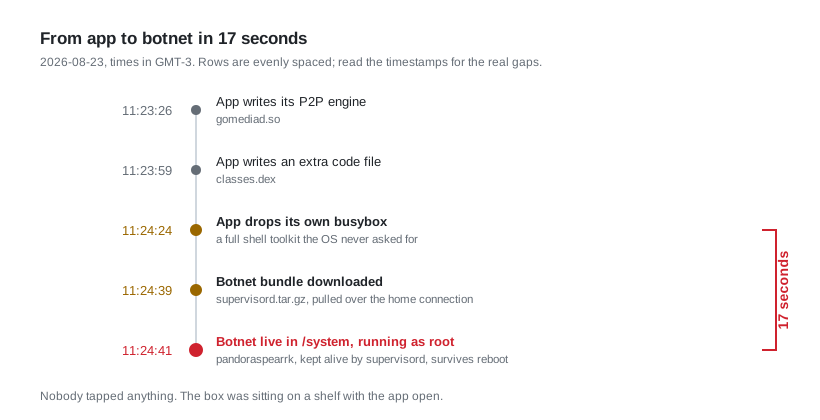
The whole install, from the app’s own folder into the protected system partition. 2026-08-23, times in GMT-3.
Seventeen seconds, back in August. Nobody touched the remote. The app was open, and that was the entire requirement.
Three things made this possible, and all three were there before any app was installed:
The box shipped rooted, with nothing asking permission. On Android, “root” means total control of the device. Normally getting it is a whole thing, and when an app asks for it you get a prompt. This firmware shipped with root already enabled and no manager app to prompt you. Any app that asked, got it. Silently. No dialog, no log, nothing on screen.
The box shipped with remote access wide open. The setting that makes Android ask “allow debugging from this computer?” was switched off at the factory. Anyone on the same Wi-Fi could have taken full control of it, no password, no approval. This is exactly what automated scanners on the internet hunt for.
The box shipped with its security enforcement turned off. Android has a built-in jail that limits what each app can touch, even with root. On this firmware it was set to “watch and complain” instead of “block”. I later found out why the vendor probably did that, and it’s an even worse story, but that’s part two.
None of this is the app’s fault. The firmware left the doors open, and the app walked through them. That’s a pattern worth remembering: the cheap box is not just weak, it’s pre-opened.
What “your box is in a botnet” actually costs you Link to heading
This is where I think most coverage of this stuff goes wrong. It gets described as “a virus”, which makes people think of a popup or a stolen password, and then nothing visibly bad happens so they stop caring.
Here’s what it actually means, concretely.
Your upload is being resold. The app turns your box into a server for other people’s video. It listens for incoming connections and uploads chunks of streams to strangers. This is why it’s free: you are the infrastructure. And home internet is wildly asymmetric, 300 Mbps down and 30 up is normal, so saturating your upload is cheap for them and ruins everything for you. Video calls stutter. Pages hang while your browser waits for its request to get out. That was the “the internet is slow” complaint, and it’s a direct cost in the one resource your connection has least of.
Your connection is the one in the attack. When that command-and-control server tells its network to attack someone, the traffic leaves from your IP. Not theirs. Yours is the address in the victim’s logs, and in your ISP’s.
Your location was being filed. At every boot, the bot wrote out a small file with the home’s public IP, the ISP, the city and the GPS coordinates. Every boot, re-checked and re-saved. Nothing about watching TV needs that.
Whatever the box could see, treat as gone. It had root for 73 days on their home network. That includes the saved Wi-Fi password. If a box like this has been in your house, the honest assumption is that everything it could read has left, and the first thing to do is change your Wi-Fi password.
And none of it shows up on screen. The app looks like a channel list the entire time.
So I tested it on a device that wasn’t broken Link to heading
I had a good control sitting in the living room, by accident.
A while back I’d bought a Xiaomi Mi TV Stick to rescue an old LG smart TV. The TV was fine as a screen but its built-in “smart” software had become unusable, slow to the point of being a joke, apps no longer updated. A R$200 stick made it a good TV again, which is genuinely the best use of these things.
That stick is everything the box isn’t: Android 14, signed by the manufacturer, not rooted, not tampered with, security enforcement actually enforcing, bootloader locked. And I could install the same IPTV app on it and watch over adb what it did.
So: identical app, two devices, same network. That’s a real experiment, and the result is the most useful thing I learned all day.
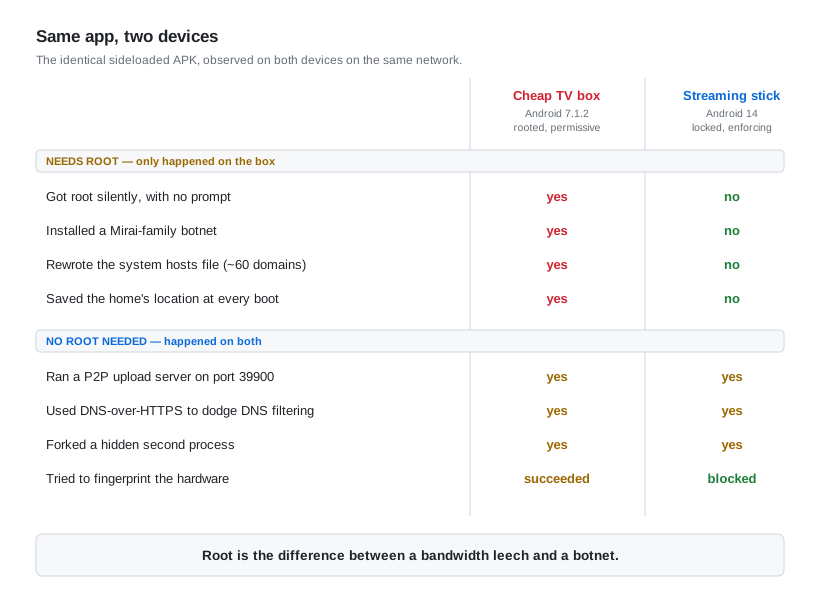
Same APK, same network, same evening.
On the locked stick there was no botnet, and no attempt to get one. The app checks whether root is available, finds it isn’t, and quietly doesn’t bother. I went looking for that attempt across about two thousand logged security events and it simply isn’t there.
But look at the bottom half of that table. Everything that doesn’t need root happened on both devices. The upload server ran on both, on the same port. The encrypted DNS ran on both. The hidden second process ran on both. The hardware fingerprinting was attempted on both and only blocked on the modern one.
So the takeaway isn’t “get a good device and you’re safe”. It’s narrower and more useful:
A locked-down device turns this from a botnet into a bandwidth leech. That’s a big win. It is not the same as safe.
The part I didn’t expect: it’s built to evade you Link to heading
A couple of details here are genuinely more sophisticated than I expected from a pirate streaming app, and they’re worth understanding because they’re why nobody notices.
It brings its own tools. The app doesn’t use the system’s programs. It ships and drops its own copies of standard Unix utilities: a downloader, a busybox (a single binary containing dozens of shell tools), an archiver, and more. Then it runs those. This matters for two reasons. One, it doesn’t depend on what the OS provides, so it works the same across a hundred different cheap firmwares. Two, these are unaudited binaries of unknown age and origin, running as root on your network. Even if nobody meant anything bad by shipping an old statically-linked curl, you now have an unpatched network client with full privileges on a device that will never be updated. The malware then went further and symlinked its busybox tools into the system directories, so that from then on, some of what the operating system ran was the attacker’s code.
It drops a tool, runs it, and deletes it. I caught one of these in the act: a busybox appeared, was executed, asked the kernel for the network card’s MAC address, and was gone. By the time I went looking for the file, it didn’t exist. Searching the entire filesystem for it found nothing. The only reason I know it happened is that the security log recorded the attempt. You cannot find this by looking for suspicious files, because between uses there are no suspicious files.
It launches a second copy of itself. Not a separate program, which is the thing anyone monitoring a device would notice. It forks a second process that is the app, with the same name and the same identity, running quietly alongside the main one with about 65 MB of its own. Nothing executed a shell. Nothing new appeared in the app list. From the outside it looks like one app using a bit more memory. On the locked stick I couldn’t even identify what that second process was doing, because identifying it requires root, which the stick correctly refused to give me.
That last one is the bit I keep thinking about. The same lock that protects users from this app also protected the app from me.
Your Pi-hole is not going to save you Link to heading
I run DNS filtering at home. A lot of people reading this do. I assumed it would at least see this thing.
It saw nothing.
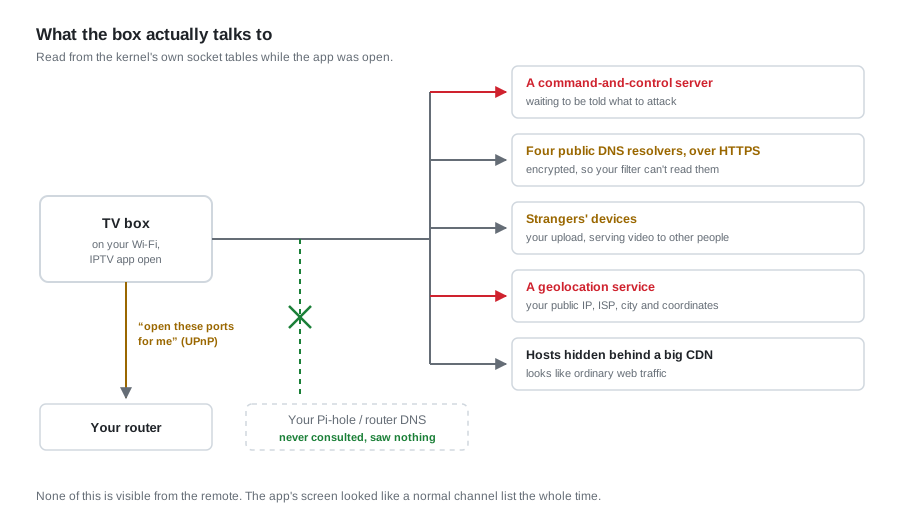
Everything one shelf device was doing, read from the kernel’s own connection tables.
DNS is the phone book of the internet. Filtering works by being the phone book: your device asks you where something.example is, and you refuse to answer. Pi-hole, your router’s blocklist, a hosts file, all of it works this way.
This app doesn’t ask. It opens an encrypted HTTPS connection straight to four big public resolvers and asks them instead. Your filter is never consulted, so it has nothing to block and nothing to log. From your router it looks like ordinary HTTPS traffic, because it is.
So I tested the layers one by one, and the results surprised me:
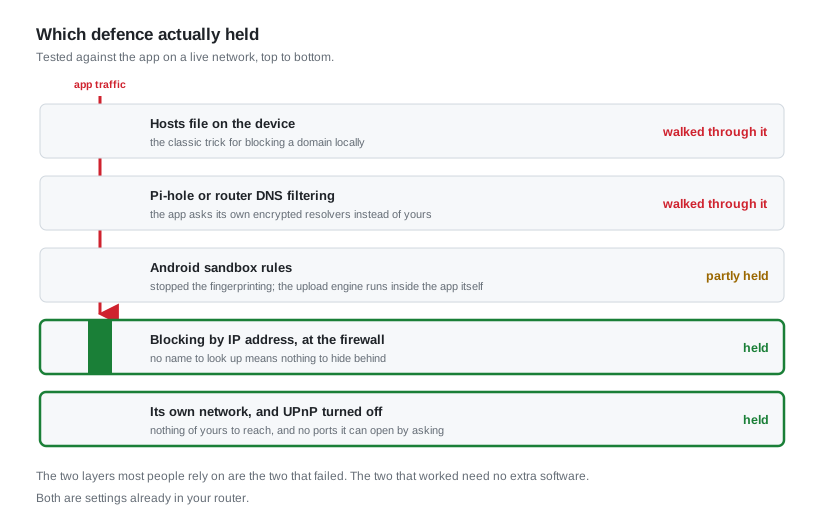
Tested against the live app. The two layers most people rely on are the two that failed.
Blocking by name failed, every time. Blocking by IP address held completely: after I set that up, the firewall counters for those addresses stayed at zero for the rest of the box’s life. There’s no clever way around a numeric block, because there’s no name to resolve.
The other thing that held is simpler still, and it’s the one I’d actually recommend: don’t let the box reach anything. Which brings us to the practical part.
Brazil already tried blocking names nationally Link to heading
Here’s the thing that makes this more than a lesson about one living room: we have run this experiment at country scale, and it failed the same way.
Blocking by DNS at the operator is the standard Brazilian anti-piracy move. It’s well established. After Operação 404, Claro, Oi, TIM and Vivo all blocked The Pirate Bay in their own DNS resolvers, the ones handed to every customer automatically [7]. And pastebin.com has been caught in that net too: Oi fibre customers reported for a long stretch that pastebin simply didn’t resolve on the operator’s DNS while working fine on any other resolver, with other customers reporting the same on Claro in some regions [8]. The reason given, informally, is exactly the one from this post: paste sites host IPTV lists, and botnets use them as a fallback channel.
Now put that next to what was actually on the box I was looking at.
The block cannot touch the malware. The bot had already pinned pastebin.com to the attacker’s own IP in the device’s hosts file, so it never asks any resolver, ISP or otherwise. The app uses DNS-over-HTTPS to resolvers of its own choosing. Neither of them is affected by what Oi’s DNS server answers. The only people a national DNS block on pastebin reaches are the people who use their ISP’s DNS as configured, which is to say ordinary users, developers, students, and not one single bot.
And it hits bystanders hard. In June 2026 GitHub’s API went dark for customers of several large Brazilian operators, breaking pushes, pull requests and CI for a lot of working developers. Anatel never confirmed an order against GitHub; the widely-held reading is that a block aimed at some *.github.io site was executed against shared infrastructure and took the API with it [9]. GitHub Pages had been through a similar episode before [10]. Anatel’s Instrução Normativa 174 now allows administrative blocking of domains, subdomains, IPs and URLs for up to twelve months on Ancine’s say-so, and the orders go to the operators under confidentiality, so when something you depend on stops resolving, there is no public list to check and nothing obvious to appeal.
So: the measure doesn’t reach the botnet, it reaches the bystanders, and you can’t audit it. That’s the same result I got on one LAN, scaled up: names are the wrong layer to block on, and the cost of getting it wrong lands on people who weren’t doing anything.
None of which is an argument that nothing should be done. It’s an argument that the thing being done is aimed at the wrong layer, and the evidence for that is sitting in my hosts file.
Why this is so common here Link to heading
I should say plainly that this is not a story about one unlucky household.
Brazil is the global centre of this problem. Anatel’s own lab concluded back in 2022 that the pirate boxes it tested contained malware able to steal personal data, send it abroad, and enlist the device in denial-of-service attacks [1], and that third parties could get administrator access to them and reach other devices on the same network [2]. By August 2025 Anatel was reporting more than 1.5 million infected boxes in Brazil, the highest count of any country [3].
The specific malware family I found has a name and a history. Dr.Web documented it in September 2023, as a Mirai derivative spreading through backdoored firmware updates and through apps advertising pirated movies and TV. Their report names several of those streaming brands directly, so follow the link if you want to check whether yours is on the list [4]. A few months later Qianxin’s XLab tied the operation together and gave the group a name, Bigpanzi, with around 170,000 active bots a day at its peak and over 1.3 million distinct IP addresses, overwhelmingly in Brazil and concentrated in São Paulo [5]. That’s not an exotic threat. On the numbers, it’s one of the most common pieces of malware in the country.
And the distribution is local and personal, which is why it spreads so well. In my experience the chain usually isn’t a download link on a sketchy website; it’s a person. Someone gets the app, likes it, and when a friend or neighbour asks how they get the channels, they refer them to the local seller who set it up for them. That seller installs it, maybe sells the box too. It arrives with a recommendation from someone you trust, which is a much better delivery mechanism than any phishing email. It’s most entrenched in the periferia, the working-class neighbourhoods on the edges of Brazilian cities, where leisure is expensive, scarce and far away, and paying for all of today’s TV and streaming services is completely out of reach for an average Brazilian family. R$150 once plus a sideloaded app is not comparable to a monthly subscription, and I want to be clear that I don’t think that choice is stupid. It’s a rational response to prices. The cost just isn’t where anyone told them it would be.
How to check your own box Link to heading
Ordered by how much work it is. Most people can do the first one in two minutes, and honestly it’s the one that tells you the most.
Level 0, your router only. No tools, no commands.
Log into your router’s admin page and look for three things:
- The UPnP page. UPnP lets a device on your network ask the router to open ports from the internet straight to it. If your TV box has entries there, it has asked for that, and you should ask yourself why a television needs to accept incoming connections. Turn UPnP off. Almost nothing in a normal house needs it.
- The connected devices list. Find the box’s address and write it down.
- The traffic graphs, if your router has them. Look at the box’s upload at a time when nobody is watching anything. Three in the morning is ideal. A TV box that’s uploading while everyone is asleep is not watching television.
Level 1, a computer on the same network.
Scan the box for open ports, with nmap or any of the phone apps that do this. A streaming device should not be listening for connections at all; it should only be making them. The box I looked at was listening on four TCP ports and about thirteen UDP ports, on every interface. Those are peer-to-peer ports. That’s the upload server.
Then, if you run Pi-hole or any DNS filtering: check whether you have queries from that box at all. If an app is clearly online and your filter has no record of it looking anything up, it’s using its own encrypted resolver, and you now know your filtering doesn’t apply to it.
Level 2, adb.
If you’re comfortable with a shell, connect with adb and the details are in part two, with the exact commands, what the output looked like, and the indicators of compromise so you can match against what I found.
The quick version: look for a process called supervisord or anything resembling pandoraspear; read /system/etc/hosts and treat anything beyond localhost as a red flag, especially pastebin.com; and list the IPTV app’s own data folder looking for a busybox, a curl or a shell script that has no business being there.
What I’d actually recommend Link to heading
In order of how much good it does per unit of effort.
- Don’t put the box on your main network. This is the whole ballgame. Most routers sold in the last few years can run a guest network; put the box on it and make sure guest devices can’t reach your LAN. Then a compromised box is just a stranger on the internet, instead of a stranger in your house with your Wi-Fi password. Everything else on this list is a distant second. That’s how I ran this one: the box sat on an isolated VLAN with no route to the rest of the LAN, and its traffic watched at the gateway.
- Turn UPnP off on the router. One checkbox. Stops the box opening ports from the internet to itself.
- Block by IP, not by name. If you’re going to block, block at the firewall. DNS blocking does not work against this, as above.
- If you’re going to run these apps anyway, run them on a locked-down device. A proper Android TV stick from a manufacturer that signs its firmware and doesn’t ship root. You’ll still be donating upload bandwidth, but you won’t be hosting a botnet. The difference is the whole second half of that comparison table.
- If a box has already been compromised, change your Wi-Fi password. Then factory reset or reflash it before you sell it, give it away or bin it. The one I looked at still had the household’s geolocation, the app’s tracking ID and the Wi-Fi credentials on it at the end.
That tracking ID is worth one last note. The app writes an identifier into shared storage, outside its own folder, which means uninstalling the app doesn’t remove it. Reinstall and it picks the same ID back up. It also means other apps can read it. I found leftovers from different IPTV apps from 2025, still sitting there months after the apps themselves were gone.
A note on how I did this Link to heading
There’s a second reason I spent an afternoon on a R$150 box, and I should be upfront about it: part of this was an exercise in seeing how far an AI model can actually get me on this kind of problem.
That’s not an idle question for me. I work as a Software Engineer at Red Hat (my LinkedIn) and a good part of my day job is the reactive end of this industry: tracking CVEs, patching them, shipping the fixes. We’re now in the middle of a genuine wave of vulnerabilities being found and fixed with model assistance, and I’d rather form an opinion from doing the work than from reading takes about it.
So, honestly, where it helped and where it didn’t.
It was genuinely good at the boring middle of an investigation. Correlating timestamps across hundreds of files to build that seventeen-second table is tedious, mechanical, and exactly the kind of thing I’d get wrong at 17:00 on a Tuesday. Same for recalling the semantics of SELinux attributes, mapping socket inodes back to processes when netstat segfaulted on me, and pattern-matching what I was seeing against published research to find out the thing had a name and a history going back years. That last one saved me hours.
Where it didn’t help is the part that matters most, and it’s worth saying plainly. Every decision about what was worth looking at was mine. So was the mistake that cost me the malware sample, and the physical one where I wired two USB hosts together and slowed down my own PC. And the SELinux test that lied to me is the cautionary tale of the whole genre: I wrote a test, it returned the answer I expected, and I believed it. Any tool, model or otherwise, will cheerfully help you confirm a conclusion you’ve already reached. What caught it was going back and testing the real thing with a real app, which is a habit rather than a capability.
My take after the afternoon: it compresses the mechanical work a lot, it does not compress the judgement at all, and its failure mode is confident agreement. Which is roughly what I’d say about a fast junior engineer, and I mean that as a compliment to both.
Where it ended up Link to heading
I cleaned the box. Removed the botnet, removed root entirely, turned on the approval prompt for remote access, took over the startup script the malware had been abusing and used it to restore the hosts file at every boot and firewall the addresses I’d found. Then I watched it for a few hours. Zero firewall hits. Nothing came back.
And then I turned it off for good.
Not because the cleanup failed, it worked, and the technical detail of how is the fun part of part two. I turned it off because once you’ve seen how little stood between an app and total control of that device, “I removed the malware” stops feeling like the relevant sentence. The firmware will never be updated. The next app, or the next version of the same one, gets the same open doors.
For what it was actually being used for, the Mi Stick that rescued the old LG does the job better anyway.
Cleaning it was a genuinely fun afternoon. Trusting it again was never on the table.
References
1 - Anatel conclui que TV box pirata pode roubar dados e fazer ataques DDoS, Tecnoblog, July 2022
2 - TV box pirata pode espiar tela de celular conectado à mesma rede, diz Anatel, Tecnoblog, December 2022
3 - Anatel alerta: Brasil tem mais de 1,5 milhão de TV boxes infectadas com malware, Tecnoblog, August 2025
4 - Pandora’s box is now open: the well-known Mirai trojan arrives in a new disguise to Android-based TV sets and TV boxes, Dr.Web, September 2023
5 - Bigpanzi botnet infects 170,000 Android TV boxes with malware, BleepingComputer on Qianxin XLab’s report, January 2024
6 - Anatel’s list of homologated TV boxes, check the certification number on the box itself, and note that Anatel warns the seal can be forged
7 - Claro, Oi, TIM e Vivo bloqueiam The Pirate Bay no Brasil após Operação 404, Tecnoblog, on operator-level DNS blocking
8 - Pastebin bloqueado na Oi fibra, Tecnoblog community thread. These are user reports of the operator’s DNS, not a confirmed published order; I haven’t found official confirmation that pastebin was formally blocked
9 - GitHub enfrenta bloqueios no Brasil após possível erro em ordens da Anatel, June 2026. Anatel did not officially confirm an order against GitHub; the collateral-damage explanation is the common reading, not an official finding
10 - GitHub Pages in Brazil not working for any website, GitHub community discussion, including the point that block orders reach operators under confidentiality
11 - Ancine aciona Anatel para bloquear sites piratas, on Instrução Normativa 174 and administrative blocking of domains, IPs and URLs for up to 12 months