Também disponível em português: Desmontando uma TV Box Comprometida.
This is the technical half. Part one is the plain-language version for people who just want to know whether to worry about the box in their living room. This one is the afternoon as it actually went: the commands, the output, the two times I killed my own shell, and the SELinux policy fight I eventually lost on purpose.
Everything below happened on 2026-11-04. Times are GMT-3. The box isn’t mine; it was brought to me to look at, and the whole investigation ran at my place with the box on an isolated VLAN, no route to the rest of the LAN. Its way out to the internet I left open on purpose: I wanted to see what the app actually streamed and how the botnet behaved, and neither of those is observable on a box with nowhere to go. I’m not naming the IPTV app, for reasons I’ll get into near the end; the malware family is public and well documented, so that part is named. Addresses on my own network have been replaced with made-up ones. Every external address, domain and hash is real, because those are the parts you might need to match against.
| TV box | Streaming stick | |
|---|---|---|
| Model | MX9, Rockchip RK3229 (4× Cortex-A7, 32-bit) | Xiaomi Mi TV Stick |
| Android | 7.1.2, build NHG47K, userdebug/test-keys, built 2018-08-06 |
14, user/release-keys |
| Root | SuperSU, /system/xbin/su + daemonsu, no manager app |
none |
| RAM reported | 2,097,152 kB | n/a |
| RAM actual | 995 MB | n/a |
| Storage | raw NAND (rknand_*) |
n/a |
Getting a shell Link to heading
There’s no adb on my machine. I run Bazzite, and I’d rather not layer an SDK onto an image-based system for one afternoon, so I built a throwaway container for it. Here’s the whole thing, if you want to do the same:
# Containerfile
FROM registry.fedoraproject.org/fedora-minimal:latest

RUN microdnf install -y android-tools \
    && microdnf clean all

# Keep the container alive so the adb server survives between exec calls.
CMD ["sleep", "infinity"]
podman build -t adb-tools -f Containerfile .

podman run -d --name adb --network host \
  -v adbkeys:/root/.android \
  adb-tools

podman exec adb adb connect 192.168.50.10:5555
podman exec adb adb -s 192.168.50.10:5555 shell
That gives you adb from Fedora’s android-tools package (1.0.41 / 37.0.0p1 at the time of writing) without putting an SDK on the host, and you can podman rmi the whole thing when you’re done.
--network host matters, because adb connect needs to reach the LAN directly. The named volume for /root/.android matters more than it looks: that’s where the ADB keypair lives, and if you lose it you get to re-approve the RSA prompt on a television with a remote control every single time.
First attempt refused the connection. A full TCP scan of the box found only 8008/8009 (Google Cast) and some DLNA ports advertising Server: Linux/3.10.104 eHomeMediaCenter/1.0. Android 7 has no “Wireless debugging” screen, and this firmware’s settings had no ADB-over-network toggle at all.
The mistake: I tried USB. USB-C on the PC into USB-A on the box, which does not work, because both ends are hosts. The box never appeared on the PC’s USB bus, and the PC got noticeably sluggish while it was plugged in: two USB hosts wired together, possibly with the box back-feeding power. Unplugged it. These boxes need USB-A to USB-A into their one OTG port, not a C-to-A cable.
What worked was going in through the front door. I installed a terminal emulator from the Play Store on the box itself and ran, as root:
su
setprop service.adb.tcp.port 5555
stop adbd
start adbd
netstat then showed :::5555, an IPv6 socket, but dual-stack, so IPv4 connects fine. In as product:rk322x_box model:MX9.
Worth sitting with for a second: I typed su and got root. No prompt, no dialog, nothing to approve. SuperSU was installed with no manager app, so there was nothing in the loop to ask a human. Every app on that device had the same deal available to it.
The box was busy doing nothing Link to heading
load average: 5.2 / 6.9 / 9.3
Nothing playing. Two native processes running as root, parented to init:
/system/bin/supervisord -c /system/bin/s.conf    (pid 1443, parent init)
/system/bin/pandoraspearrk                        (pid 1453, child of supervisord)
supervisord is a legitimate and well-known process supervisor, the Go single-binary one here, not the Python one. Nothing about a TV box needs a process supervisor. Its config kept pandoraspearrk alive with autorestart=true and logged to /data/sp.log.
Boot persistence was the vendor’s own startup hook. /init.rk30board.rc has:
service preinstall /system/bin/preinstall.sh
…and the last line of that script had been changed to launch supervisord. Nothing added a new init service, which is the thing you’d look for. It appended one line to a script the vendor already ran as root at every boot.
Then the socket tables, read straight from /proc:
192.168.50.10:47705 -> 173.255.220.200:9999 ESTABLISHED (root)
Port 9999, held open by a root process, to an address with no business in a Brazilian living room. That’s the C2.
The hosts file, and why pastebin.com is the tell
Link to heading
/system/etc/hosts had been rewritten with about 60 entries pointing at attacker-controlled IPs. pandorabackup.*, *.pdonno.com, *.panddna.com, a pile of pcdn* domains. Rewritten at every boot; its mtime was 14:00:01, seconds after the boot I was looking at.
And this entry:
23.12.198.15 pastebin.com
That one is the giveaway, and it’s worth explaining because it’s genuinely clever. Botnets in this family use pastebin as a fallback channel for configuration and C2 addresses: if the primary server goes down, the bot fetches a paste to find out where to go next. Which means pastebin is also where a researcher or a competing operator could publish something to redirect the bots. By pinning pastebin.com to their own IP on every infected device, the operator keeps exclusive control of that fallback channel. It’s not blocking pastebin for the user. It’s making sure that when the bot asks pastebin a question, the operator is the one who answers.
There’s a nice irony here. Brazilian ISPs have themselves blocked pastebin at the DNS level, reportedly because paste sites carry IPTV lists and botnet configs. But a hosts entry like the one above means this device never asks a resolver at all, and the app on top of it uses DNS-over-HTTPS. The national block reaches the customer; it cannot reach the bot sitting on that customer’s shelf. I went into that properly in part one.
Also in /data: a.sh (a self-updater), supervisord.tar.gz (the payload bundle), copies of pandoraspearrk, supervisord, busybox, curl, arp, tar, a .ms encrypted blob, and a file called txt containing the string Need Upgraded!.
The updater, a.sh, is the piece that tells you this is a product rather than a prank. It checks the device model against a specific list of set-top box models (the IPTV operator’s own branded hardware) and otherwise pulls cpcdn.sh / pd.sh / rku.sh from an update host. Somebody maintains this. There are per-model code paths.
Attribution Link to heading
This is the part I was most careful about, because “an app installed malware” is a serious claim and the honest answer has layers. In strength order:
1. The installer lives in the app’s private directory. /data/data/<the IPTV app>/files/ contained .tmp.sh. On Android, that directory is only writable by that app’s own UID. Nothing else on the device can put a file there. The script remounts /system read-write, downloads the bundle, copies binaries into /system/bin/, symlinks busybox applets into /system/xbin, and hooks whatever boot service it can find. It also frees space in /system by deleting bundled apps when the partition is ≥95% full, which is why the Kodi install that shipped with this firmware was simply gone.
2. File ownership. /data/curl is owned by u0_a52. Cross-referencing /data/system/packages.list, u0_a52 is the IPTV app.
3. The timestamps line up to the second.
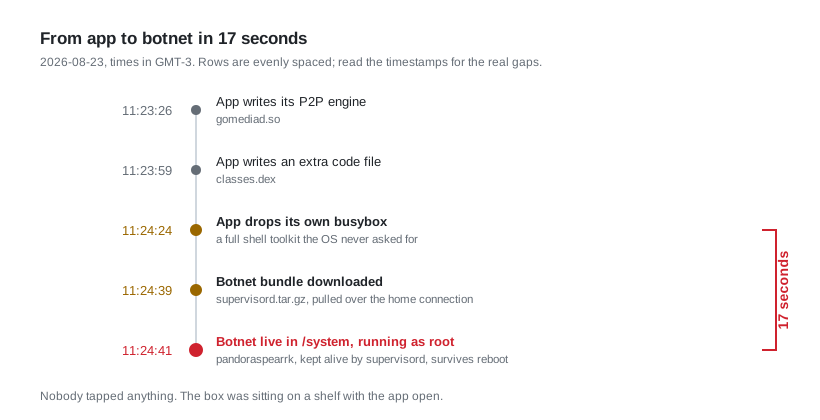
| Time (GMT-3) | File | What |
|---|---|---|
| 2026-08-23 11:23:26 | <app>/files/gomediad.so |
app drops its P2P engine |
| 2026-08-23 11:23:59 | <app>/files/classes.dex |
app drops an extra dex |
| 2026-08-23 11:24:24 | <app>/files/busybox |
app drops busybox |
| 2026-08-23 11:24:39 | /data/supervisord.tar.gz |
botnet bundle downloaded |
| 2026-08-23 11:24:41 | /system/bin/pandoraspearrk |
botnet installed into /system |
| 2026-08-28 13:05:16 | <app>/files/curl, .tmp.sh |
installer refreshed |
| 2026-08-28 13:10:15 | app base.apk |
app updates itself, 5 min later |
| 2026-10-11 22:41:13 | /data/a.sh, /system/bin/s.conf |
updater replaced |
What this evidences, and what it doesn’t. It establishes that the dropper executed from inside that app’s private storage, with that app’s privileges, and that the botnet landed in /system seventeen seconds later. That’s about as clear as filesystem forensics gets on a live device.
What it does not establish is intent, or who in the chain is responsible. A packed APK with an obfuscated payload could be the vendor shipping a botnet knowingly; or a compromised third-party SDK; or a build pipeline somebody else owns. I can’t distinguish those from the outside, and anyone who tells you they can from this evidence is overselling.
That distinction is also why I’m not naming the app. What I can point at is Dr.Web’s September 2023 report on this family, which names several pirate-streaming brands as distribution vectors and describes exactly this behaviour [1]. If your app is on their list, that’s their published finding, not my accusation.
The family itself: Pandoraspear, a Mirai derivative. Qianxin’s XLab attributes the operation to a group they call Bigpanzi: ~170,000 daily active bots at peak, 1.3M+ distinct IPs, overwhelmingly Brazil, concentrated in São Paulo [2]. Version numbering in the samples suggests continuous development since about 2015.
Bring your own userland Link to heading
The thing I keep coming back to is how much of its own operating system this malware ships.
Into /system/bin/: pandoraspearrk, supervisord, s.conf, and its own curl, arp and awk. Into /system/xbin/: busybox plus symlinks for arp, awk, tar, xz, all dated 2026-08-23 11:24.
Two things follow from that, and the second is the one people miss.
The obvious one is portability. If you don’t depend on what the firmware provides, you work identically across hundreds of cheap boxes with wildly different toybox/busybox situations. That’s just competent engineering, applied to a bad end.
The subtle one is that it replaced parts of the operating system’s own toolchain. Once /system/xbin/awk is a symlink to the attacker’s busybox, every script on the device that calls awk is running attacker-supplied code. The vendor’s own boot scripts included. You haven’t just got malware on the box; you’ve got malware underneath the box’s own shell plumbing.
And these are unaudited statically-linked ARM binaries of unknown provenance, running as root, on a device that will never receive an update. Even setting aside deliberate backdoors, that bundled curl has whatever CVEs it was built with, forever. This is the supply-chain argument for why rooted consumer devices are a bad idea, except you don’t have to argue it hypothetically; it’s sitting there in ls -la.
I found this out the annoying way during cleanup. I deleted the malicious symlinks, and my next one-liner broke, because I’d removed the awk the shell was about to use.
The APK itself Link to heading
Pulled both APKs for offline string analysis. The app is packed: a DexHelper/Bangcle-style commercial protector, so the real logic is encrypted and unpacked at runtime. What’s visible in classes.dex is a loader stub plus some strings that survived:
- a check for
/system/xbin/su, the root test, done as a plain file existence check busyboxpcdn(7 occurrences)luna(14 occurrences; the P2P cache directory isapp_luna)
It ships gomediad.so, a 15 MB P2P/PCDN engine, and a small packed helper. The box had 4.20.1; the stick has 4.22.0. Same packer, same root-check strings in both.
The packing matters for a reason beyond hiding logic: the visible code is not what runs, so static analysis of the shipped dex tells you almost nothing. And the root check being a plain stat() rather than an exec is why it leaves no trace on a device where it fails: nothing is logged, because nothing was attempted.
Sample hygiene, since people ask. The ARM binaries were hashed, scanned as text, and deleted from the PC. They can’t execute on x86 and were never run. Later I kept a few APKs for a possible sandbox, streamed straight from the device into an AES-encrypted 7z archive with encrypted filenames, so no plaintext APK ever touched my disk:
adb exec-out cat /path/to/app.apk | 7z a -si -p -mhe=on quarantine.7z
One gotcha: adb exec-out su -c cat binary > out corrupts binaries. su allocates a pty, which converts LF to CRLF, and your file grows. Copy to /sdcard first and adb pull it, or skip su.
And a real lesson, learned too late: grab the sample before you uninstall. The dropper version was on the box and nowhere else. Uninstalling it destroyed the last copy in existence that I had access to. All I have now is the sha256.
Cleanup Link to heading
Order matters here, and the first two steps are the ones people skip.
Back up first. /data/local/backup-20261104/system-originals.tgz on the box: preinstall.sh, rootsudaemon.sh, su, daemonsu, supolicy, hosts, build.prop, /data/adb.
Confirm you have another way in before you remove the way you’re using. ro.debuggable=1 on this userdebug build means adb root works. I verified that before deleting su, because removing root while your only root is su is how you brick your own afternoon.
Then:
1. Kill the botnet. Killing supervisord took pandoraspearrk with it. Then deleted /system/bin/{pandoraspearrk,supervisord,s.conf,curl,arp,awk}, the malware’s /system/xbin busybox symlinks, and the /data payload set.
Gotcha:
busybox pkill -f daemonsukilled my own adb shell, because-fmatches the full command line and my shell’s command line contained the pattern. This happened to me twice in one afternoon, the second time withpkill -f "7z a ..."during the quarantine step. If you usepkill -f, your own process is a candidate.
2. Remove root for apps. Killed every daemonsu, deleted /system/xbin/su, /system/xbin/daemonsu, /system/bin/rootsudaemon.sh, /data/adb. Admin access is now adb root only, which requires physical approval.
3. Require ADB approval. /system/build.prop: ro.adb.secure=0 → 1. After reboot, adb showed unauthorized until I accepted the RSA prompt on the TV. (I missed the first prompt; adb disconnect then connect shows it again.) Before this change, anyone on the LAN had a root shell on port 5555 for the asking.
4. Take over the boot hook the malware was abusing. Same preinstall.sh the dropper hijacked, now mine:
- restore
/system/etc/hostsfrom a hardened copy if it changed (the 61 malware domains →0.0.0.0) - build an iptables chain
ioc_blockinOUTPUT, rejecting the C2 plus 31 addresses the dropper had pinned (I excluded the Cloudflare anycast IPs; blocking those breaks half the internet and tells you nothing) - re-enable network ADB for me
- optionally apply a SELinux policy, which is its own story below
Verification from the next boot’s log: supolicy Success, hosts byte-identical to the hardened copy, ioc_block with 32 REJECT rules sitting first in OUTPUT, no su, no daemonsu, no supervisord, no pandoraspearrk, /system mounted read-only.
Zero hits on all 32 reject rules for the remainder of the box’s life. Nothing tried to phone home again.
The SELinux story, including the test that lied to me Link to heading
The box shipped Permissive. The firmware ships SuperSU’s supolicy, which can patch policy live, so I tried to build a jail using the vendor’s own tool.
The goal: stop third-party apps from executing binaries they downloaded, which is the entire dropper mechanism.
deny untrusted_app app_data_file file execute_no_trans
I kept execute (mmap) allowed, because packed dex/oat and native .so loading need it: deny that and every app on the device breaks, including the ones you want.
Then I tested it:
runcon u:r:untrusted_app:s0 sh
Failed. Rule works. Moving on.
Except that test was worthless. runcon into untrusted_app fails for any binary, because untrusted_app has no entrypoint permission on them, and that’s a different denial than the one I was testing for. I’d written a test that passes whether or not my rule exists, which is the worst kind of test.
The real check was to launch an actual app and look for a shell child. The terminal emulator spawned sh happily. The rule did nothing.
The reason is that the permission came from the appdomain attribute, not from untrusted_app directly, and SELinux allow rules are a union, denying one type does nothing while a broader attribute still permits it. The fix:
deny appdomain shell_exec file execute_no_trans
allow <each system type> shell_exec file execute_no_trans
Re-allowing system_server, nfc, platform_app, bluetooth, recovery, priv_app, init, radio, shared_relro, system_app, su and shell. Net effect: only untrusted_app and isolated_app can’t start a shell. Verified properly this time: terminal app launches, no sh child.
Then Enforcing broke two things, and neither was my fault:
Audio. audioserver was denied read on its own netlink_kobject_uevent_socket (the socket it uses to hear about HDMI and audio hotplug) about 1,460 times a minute, burning ~20% CPU on the denials. Fix:
allow audioserver audioserver netlink_kobject_uevent_socket { read create bind setopt getopt }
Video. Audio played, picture didn’t. No denials in the window, no codec errors, nothing obvious. It took a while to find: the factory policy denies mediacodec access to
/sys/firmware/devicetree/base/vpu_service@20020000/iommu_enabled
so the hardware video decoder can’t initialise. Audio keeps working because it’s on the software path. This is a bug in the vendor’s own policy, not in my rules: any Enforcing boot on this firmware breaks hardware video decode. Which is almost certainly why it shipped Permissive in the first place. The vendor hit this, and instead of fixing four lines of policy, disabled the security model for every device they sold.
I added the fix:
allow mediacodec sysfs file { read open getattr }
…and then turned the jail off anyway, behind a flag file so it can be switched back on. The honest reasons: the person using this box wanted to watch television, I’d already removed root and made /system read-only, and the jail didn’t block the thing I actually cared about. Which brings us to the limits.
What the jail couldn’t touch Link to heading
I reinstalled a clean 4.22.0 with no root available and watched it. Under Enforcing, the only denials from the app were sysfs reads of /sys/class/net/*/duplex by a thread named ranger. No exec attempts. No shell. No .tmp.sh.
The jail stopped the fingerprinting and nothing else, because:
The P2P engine runs inside the app process. ranger / libranger-jni.so is a JNI library loaded into the app itself, not a separate binary. There is no exec to deny. Any policy that blocks it also blocks the app from loading its own native code, which breaks playback. Its state lives in app_luna/ (.p2p_host_cache, .upnp_cache).
So here’s what the clean app still did, from /proc/net/tcp{,6} mapped back to processes through /proc/*/fd socket inodes. netstat segfaults on this firmware’s toybox, so you read the kernel tables directly:
- Listening on all interfaces: 4 TCP ports (39900, 49462, 46245, and 47287 on IPv6) plus ~13 UDP. Peer ports. The box is a server.
- DoH to four resolvers on 443:
8.8.8.8,1.1.1.1,9.9.9.10(Quad9),223.5.5.5(AliDNS). This is why the hosts file was the wrong layer and the IP firewall was the right one. - Cloudflare-fronted hosts on 80/443, indistinguishable from normal web traffic.
- A VPS on a non-standard port:
192.3.185.237:31521(ColoCrossing/RackNerd range) plus an IPv6 peer on the same port. Looks like a tracker or relay. - A UPnP cache, meaning it asks the router to open ports for inbound peers.
app_luna/block_cache/test.txt: a 204,800-byte file marked executable, zeros at the start. A disk-speed probe for the P2P block cache: it’s benchmarking your storage to decide how hard to use it.
And the hidden busybox. At 17:05:35, uid=10063 busybox made ioctl calls on a UDP socket: 0x8927 (SIOCGIFHWADDR, the MAC address), plus 0x891d and 0x8970. A thread with a hex-encoded name also read /sys/class/net/*/address.
Then:
# find / -name "*busybox*"
#
Nothing. Not in files/, not in .cache/, not in lib/. The app drops it, runs it, and deletes it, or runs it from memory. The jail blocked its MAC reads but not the exec, which tells me it didn’t come from app_data_file. I never found where it came from.
You cannot detect this by looking for files. Between invocations, there is no file. The only artifact is a log line from a denial, and on a Permissive device there isn’t even that.
The control: the same app on a locked device Link to heading
I had a Mi TV Stick in the living room (bought to make an old LG smart TV usable again, which it does well), so I installed the same APK on it and watched. Android 14, release-keys, not rooted, bootloader locked, verified boot green. A genuinely clean environment for the same software.
No root attempt at all. Across ~2,000 logged denials for the app there is no execute, no shell_exec, no su, no xbin, no busybox, no remount. The dropper path stays dormant: it stat()s /system/xbin/su, which isn’t logged, finds nothing, and doesn’t try.
What Android 14 did block, all untrusted_app_32, permissive=0:
| count | denied read of | what it’s for |
|---|---|---|
| 584 | /proc/diskstats |
disk I/O stats |
| 424 | /proc/net/sockstat |
system-wide socket counts |
| 420 | /proc/net/snmp |
system-wide TCP/UDP counters |
| 314 | /proc/loadavg |
CPU load |
| 311 | /proc/net/dev |
per-interface traffic counters |
| 183 | search /mnt/vendor |
vendor partition probe |
| 4 | binder SwlNativeService |
looking for a vendor service |
| 1 | vendor_xiaomi_prop |
Xiaomi device properties |
The thread doing all of this is ranger again, the P2P engine, polling roughly once a second. Read that table as a whole and it’s obvious what it’s for: disk throughput, system load, and per-interface traffic counters are exactly what you’d sample to decide how much upload you can take from this device before the owner notices. On the box, under Permissive, all of those reads simply succeeded.
That’s the “stays under the radar” behaviour, and it’s a design decision. A P2P client that just saturated your uplink would get uninstalled. One that measures your headroom first does not.
And the second process. Android logged PhantomProcessRecord {4239:3271:<app>}, a native child of the app. After a relaunch it was pid 6316, ppid 4689, named identically to its parent, 2 threads, 65 MB RSS, same SELinux domain, no tracer attached. Not an exec of sh or su; a fork() of the app itself.
This is the most evasive thing in the whole writeup, and it’s evasive precisely because it’s boring. Nothing new in the app list. No shell spawned. No new SELinux domain. Process-level monitoring sees one app using slightly more memory. Typical of the packer’s guard process or a P2P worker, and I couldn’t narrow it down further, because /proc/<pid>/exe and maps need root and the stick correctly wouldn’t give it to me.
I tried: adb root → adbd cannot run as root in production builds. ro.build.type=user, ro.debuggable=0, ro.secure=1, ro.boot.flash.locked=1, verifiedbootstate=green. The only routes in are a bootloader unlock (wipes the device, usually not offered on these sticks) or an exploit. Neither happened.
There’s a real irony in that. After cleanup the box was the perfect lab: adb root for me, no su for apps. The locked stick is safer for its owner and completely opaque to me. The same lock that protects users hides the app from researchers. That’s not an argument against locked devices; it’s an argument for why independent analysis of this category is so thin.
Firmware sins, free of charge Link to heading
None of these are the malware. All of them were there from the factory.
Fake RAM. MemTotal is exactly 2,097,152 kB, suspiciously exactly 2 GiB. dumpsys meminfo reports Lost RAM 1,193,507K. free -m says the real total is 995 MB. The “2 GB” on the box is a lie told in the kernel command line.
Fake load average. Load 7 at idle, CPU 90% idle. The load is kernel threads stuck in D state: rknand and four ssv6xxx_encry Wi-Fi threads. They count toward load and consume no CPU. The box looks like it’s dying and is merely badly engineered.
Broken swap, at every boot since 2018. fstab.rk30board defines zram0 as swap, init.box.rc writes lz4 to comp_algorithm, and the kernel has no lz4:
zram: Cannot initialise lz4 compressing backend
fs_mgr: swapon failed
A 1 GB device shipped with zero swap because of a one-word mismatch nobody ever tested. I fixed it in my boot hook (reset, lzo, 256 MB, mkswap, swapon); within minutes ~40 MB had swapped out.
A factory stress-test app that won’t die. com.cghs.stresstest is a persistent system-UID priv-app with RECEIVE_BOOT_COMPLETED. pm disable doesn’t stop it. pm disable-user doesn’t stop it, because Android 7 starts persistent apps regardless. pm hide finally worked.
Wi-Fi is an iComm SSV6051, poorly supported, and the reason most RK3229 Armbian/LibreELEC images end up with no wireless. It dropped off the network for a few minutes after one reboot, then came back.
The keyboard typed Chinese. Default IME was Google Pinyin, with the system locale set to pt-BR. Nobody tested that either.
Put together: the firmware is built so that sideloading “just works”, and that is exactly what makes it trivial to own. The malware didn’t exploit anything. It used root that was offered, wrote to a /system that remounts freely, and appended a line to a boot script that runs as root. Every door it used was installed by the vendor.
Was the rest of the network hit? Link to heading
Pandoraspear is Mirai-derived, and Mirai spreads by brute-forcing telnet and SSH on other devices. So I checked the PC (Bazzite, x86_64):
- no telnet server;
sshdinactive - nothing listening on the LAN interface except Steam (27036), KDE Connect (1716), mDNS/LLMNR
- no connections to any IOC address, or to ports 9999/23/2323
- every outbound connection mapped to a known application
- no processes running from
/tmp,/dev/shm, or deleted binaries (the/dev/shm/u1000-Shm_*files aresteamwebhelper) /etc/hostsclean; no systemd units changed since August except ones I installed- the USB-C experiment never established a data connection, so nothing crossed that way
Other LAN devices talking to the box were phones, the PC and Home Assistant over Cast (8008/8009), which is normal Cast discovery.
One loose end I’ll be honest about: I tried to enumerate the router’s UPnP mappings from the PC with an SSDP M-SEARCH for an InternetGatewayDevice and GetGenericPortMappingEntry, and no IGD answered. That result says nothing about the router, though. I run OPNsense, SSDP multicast doesn’t cross it without a rule I’d have to add deliberately, and I wasn’t going to open that up for a box I had for one afternoon. The scan could not have worked here. The app kept a .upnp_cache, so it was certainly trying. Check your router’s page by hand rather than trusting a scan like I did.
Indicators of compromise Link to heading
If you want to check a box, these are what to match. Published because detection content is for defenders; the dropper’s actual mechanics are not here.
Files
/system/bin/pandoraspearrk
/system/bin/supervisord
/system/bin/s.conf
/system/bin/curl
/data/a.sh
/data/s.conf
/data/sp.log
/data/supervisord.tar.gz
/data/.ms
/data/txt
/data/data/<iptv app>/files/.tmp.sh
/sdcard/ipfull                       (victim geolocation JSON, rewritten at boot)
/sdcard/.config, /sdcard/.properties (tracking IDs that survive reinstall)
SHA-256 of the installed components
These are the files the dropper placed on the device, not the app that carried it:
| sha256 | file |
|---|---|
6cd689de76459a92d0a7ee9700860578c6906829b2839d94b46c26b288971707 |
pandoraspearrk, the bot itself |
a6c7c7636fd3929bcdb0bb2104302fcb49792164abe0cd743b06676bd0259172 |
supervisord, keeps the bot alive |
a16fe5d6fb56fae12e4b00c58121145d209e4a38aa51a75bfb20c912058a95b9 |
supervisord.tar.gz, the payload bundle as downloaded |
9e78365c8cbe5994f932166250be98e185e14877845bf9deb90431597486b0a7 |
/system/bin/s.conf, supervisor config |
d7597c8b4a241d57a540ed9a66a6b3526a745d1314fd6248e96e9eecd06fa18a |
/data/s.conf, second copy |
3a6e939c4b4cc2697bbdf81585af8f8ea1616a2038833475326d5fc1533e5597 |
/data/a.sh, the self-updater |
adb9598f640102daee72581813fdb0997b857edb92833c317f04698a9d8a02b7 |
.tmp.sh, the dropper, from the app’s private directory |
f55d2bd57db658ab61ab2cc1405bf9e239b95a2602c8ceb767051079ad0d5735 |
the hijacked /system/etc/hosts (61 entries) |
722744c07404c35986a082d06e4363ffa7852329690ec90b72c0551bc3206430 |
preinstall.sh after the malware appended its launch line |
The first four are the ones worth matching: they’re the botnet’s own binaries and config. The last two are device-specific: the hosts file and the vendor’s boot script will differ between firmwares, so treat those as reference rather than as signatures.
Network
C2:             173.255.220.200:9999
Update hosts:   nisge.eylcqofxg.com
                fadfa.gdalieyw.com:8080
                fadfatest.pneydn.com:8080
                pandorabackup.lftpdo.com
P2P listen:     39900/tcp  (same port on both devices)
Peer/relay:     192.3.185.237:31521, 38.145.199.56:48985
Quick triage, on a box you can get a shell on
ps -A | grep -E "supervisord|pandora|daemonsu"
cat /system/etc/hosts          # anything past localhost is a red flag
grep -c . /system/etc/hosts    # ~60 entries means it's been rewritten
cat /proc/net/tcp              # look for :270F (9999) and unknown addresses
ls -la /data/data/<iptv app>/files/   # .tmp.sh, busybox, curl
getprop ro.adb.secure          # 0 means anyone on your LAN can take the box
getprop ro.debuggable
ls -la /system/xbin/su /system/xbin/daemonsu
getenforce
If ro.adb.secure is 0 and su exists with no manager app, the box is pre-compromised whether or not anything has arrived yet.
Final state, and the shelf Link to heading
| Botnet | removed, 0 firewall hits afterwards |
| Root for apps | gone (su/daemonsu deleted) |
| ADB | RSA approval required; root only via adb root |
| SELinux | Permissive by choice; jail available behind a flag, with audio + video policy fixes |
| Network | 61-domain hosts sinkhole restored at boot, ioc_block with 32 addresses |
| Memory | zram 256 MB lzo fixed, ~30 apps disabled or hidden |
| Exposure window | 73 days (2026-08-23 11:24 → 2026-11-04 ~15:15) |
Then I turned it off for good.
The cleanup worked, and I enjoyed it. But a device whose vendor disabled the security model to work around their own policy bug, shipped silent root, shipped unauthenticated remote access, and will never be updated, is not a device you secure. It’s a device you stop using. The next app gets the same open doors.
Before it left the house: everything it could read is treated as leaked. Wi-Fi password rotated. Its storage still held the household’s geolocation, the app’s tracking tokens and wpa_supplicant.conf, so factory reset from recovery, or better, reflash, before any box like this goes to a new owner.
The one genuinely useful thing I’d tell anyone repeating this: take the sample first. I uninstalled the dropper version before I’d archived it, and destroyed the only copy I’ll ever have. The hash is all that’s left.
References
1 - Pandora’s box is now open: the well-known Mirai trojan arrives in a new disguise to Android-based TV sets and TV boxes, Dr.Web, September 2023
2 - Bigpanzi botnet infects 170,000 Android TV boxes with malware, BleepingComputer on Qianxin XLab’s report, January 2024
3 - Anatel conclui que TV box pirata pode roubar dados e fazer ataques DDoS, Tecnoblog, July 2022
4 - Armbian for rk322x TV boxes, if you want to reflash rather than clean. Raw NAND limits the options; jock2’s Multitool can back up stock firmware first
5 - CSC Armbian for rk322x TV box boards, forum thread, including which boards lose Wi-Fi